
General
MM = Mile Marker
KmM = Kilometer Marker
Mostly what I describe are rides that can be done from one location. In other words, loops or out-and-back rides. I generally don’t describe point-to-point rides where you need a support vehicle or have to figure out how to get back.
Great Cycling Web Sites
Cycling Challenge is probably the best web site about cycling in the Alps.
A website that shows the Top Cycling Climbs in the US.
CyclingCols is a great site for showing the average and maximum gradients of each kilometer of climbs.
Altometrias has the most beautiful gradient diagrams I have ever seen.
Distances and Elevation Gained
I use a variety of sources for the distance and elevation gained: my bike computer (a Hammerhead Karoo currently), Google Maps, and John Summerson’s book, The Complete Guide to Climbing (By Bike).
- If I’m describing a climb in Summerson’s book, I usually use his statistics.
- If I’m riding with my bike computer, I usually use the distance and elevation from the Garmin.
- If it’s not a Summerson climb and I forgot my bike computer, I use Google Maps.
- And sometimes I’ll compromise between my bike computer readings and what Google says.
GPS elevation readings are simply not very consistent so the elevation gained can vary between sources. I’ve even been on a ride with a friend who also has an identical bike computer and our bike computers showed a difference of several hundred feet at the end of the ride. In other words, whatever the source, the computed elevation gained is an approximation of reality.
Dynamic Watch
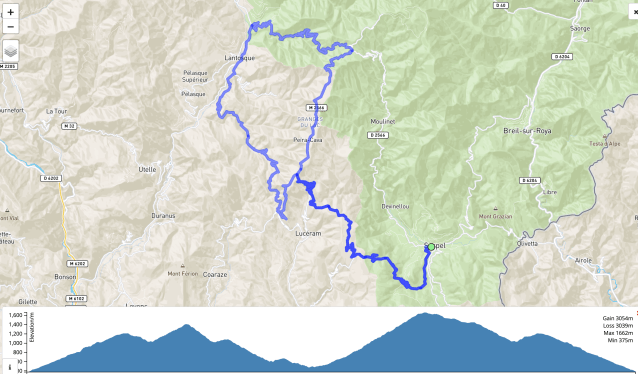
I’ve started using Dynamic Watch for mapping out routes and viewing the ride profile. It is extremely easy to use and will also create a .gpx file that you can download and add to your bike computer. You can see examples of the map and profile in use here. And here’s an immediate example.
Google Information
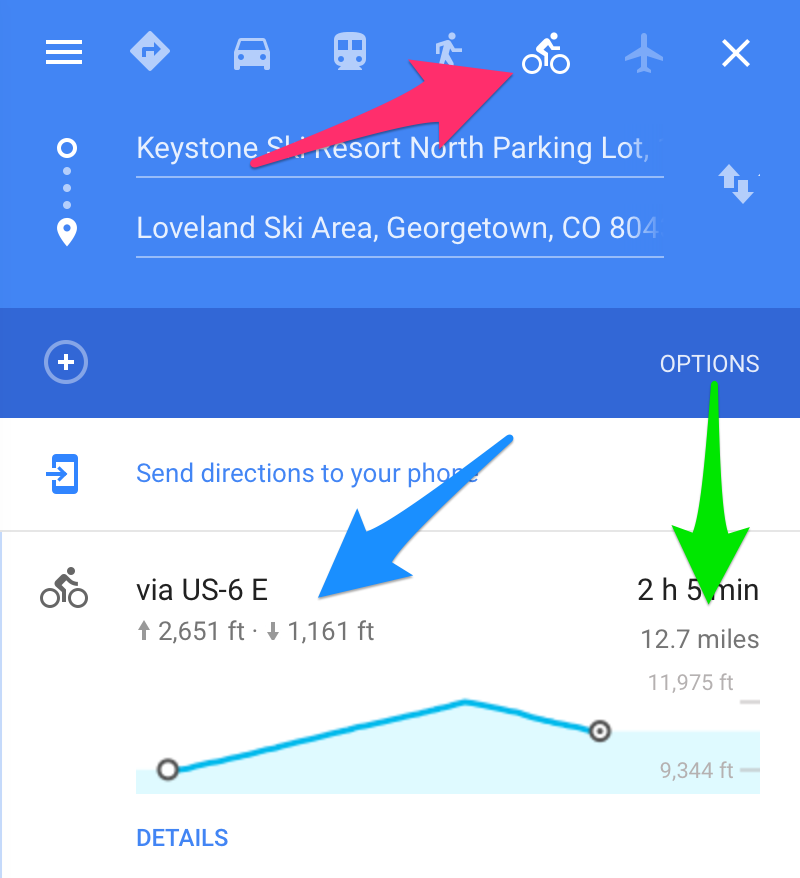 Google Maps will show you a basic ride profile and give you elevation gained and lost – if you choose the Bicycle option. One thing to be aware of is that Google sometimes re-routes you if you go from Car to Bicycle, so make sure the route is still correct.
The red arrow points to the Bicycle option, blue to elevation gained and lost, and green to distance traveled.
The ride profile is shown below the elevations and distance.
 Cycle Uphill